Site administrators
A website administrator (manager) is an employee with their own username and password. They work in the account almost like the owner, but they don't see payments and can't delete the website.
What is available to the administrator?#
- Ads and products: moderation, editing, orders.
- Website settings: branding, mode, pages, contacts, Telegram and WhatsApp, advertising, SEO.
- Posts, integrations, AI assistant (according to the site's tariff).
Unavailable: plans and payments, website deletion, switching to other websites in the account. The administrator is tied to one website.
How to create#
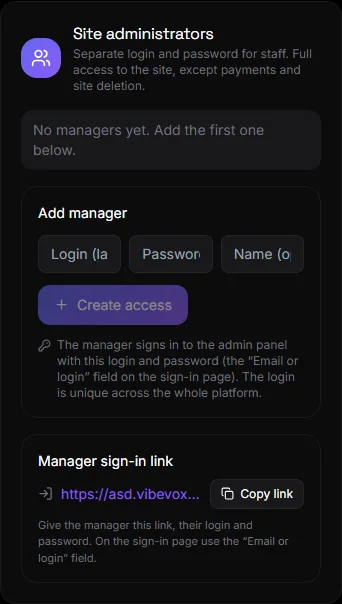
Settings → Managers:
- Enter your login (in Latin; the login is unique across the entire platform), a password of at least 6 characters, and your name (optional).
- Click "Create Access".
- Copy the "Manager Login Link" and give it to the employee along with their username and password. They will use the "Email or Username" field on the login page.
Control#
- Disable / Enable - temporarily block access without deleting.
- Change password - set a new password.
- Delete - the employee loses access permanently.
Questions and answers#
Can an administrator add products to the site?#
Yes. He opens the site as an administrator from the main dashboard and adds products just like the owner.
Can the administrator see keys and tokens?#
Bot tokens and payment keys are shown as dots. The payment block is unavailable.
How many administrators can be created?#
There is no limit.