SEO and AI indexing
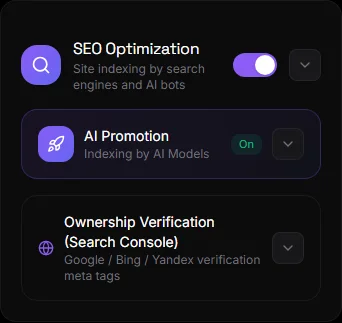
The website is designed to be found by search engines (Google, Bing, Yandex) and AI assistants (ChatGPT, Perplexity, Gemini). Much of the work is done automatically. The "SEO and Promotion" section in Settings displays the status and allows you to enable additional features.
What happens by itself#
| When | What |
|---|---|
| When saving the product | The product is added to /sitemap.xml; structured data for Google Rich Results (price, availability, photo); preview when forwarded to social networks (Open Graph); correct addresses (canonical) without duplicates |
| When creating a website | robots.txt with permissions for search and AI bots; llms.txt — instructions for AI assistants; installation as an app (PWA); title and description for pages |
| Always | Server-side rendering: content is visible to the bot without JavaScript execution; page rendering is fast (First Contentful Paint takes less than a second) |
Categories have their own SEO title and description (see the "Catalog" section). Pages have search engine descriptions (via the AI assistant: "Set an SEO description for the "Delivery" page").
SEO Analyzer#
Click "Analysis"—all items are checked: title, description, logo, favicon, forwarding image, categories, domain, and indexing. Result: "Excellent—configured" or a list of areas for improvement.
AI promotion (GEO)#
GEO — optimization for AI assistants. "Enable site for AI indexing" toggle:
- On — the site is open to AI bots (GPTBot, ClaudeBot, PerplexityBot, and others) and is included in
llms.txt. Your products may appear in assistants' responses. - Off - AI bots are prohibited in
robots.txt.
Additionally: "AI Knowledge Base" in the "AI and MCP" block — uploading products for Gemini Gem or NotebookLM. See Connecting Claude, ChatGPT, and Gemini.
Verifying Rights (Search Console)#
To view statistics in Google Search Console, Bing Webmaster, or Yandex Webmaster, you need to verify your website. Copy the content value from the verification meta tag, paste it into the field, and click "Save Codes." The tag will be added to your website pages. This works entirely on your own domain.
Hide your website from search engines#
The "SEO optimization" switch is off—the site is noindex and isn't indexed. This is useful while you're updating it. Don't forget to turn it back on.
Adviсe#
- Connect your domain—the sitemap, feed, and verification are fully functional on your domain. See Your Domain.
- Fill in the name, description, logo, and image for shipping. See Branding.
- Give your categories SEO-friendly titles and descriptions.
- Create "About Us," "Delivery," and "Contact Us" pages—search engines appreciate a clear structure. See Home and Menu.
- Check the site with an analyzer after changes.
Questions and answers#
The site doesn't appear in Google. Why?#
Indexing takes anywhere from a few days to weeks. Check: SEO is enabled (no "noindex"), the domain is verified in Search Console, and the sitemap is submitted there (https://ваш-домен/sitemap.xml).
What is llms.txt?#
A website description file for AI assistants, similar to robots.txt for search engines. It's created automatically.
Do I need to do anything with images for SEO?#
No. File names and photo captions are generated automatically from product names.