Noticeboard mode
Classifieds is a mode where site visitors add ads. You set categories, review ads, and earn money from advertising and promotion.
Who is this suitable for?
City flea market, auto dismantling and spare parts, real estate, repair services, community or organization announcements.
How to enable#
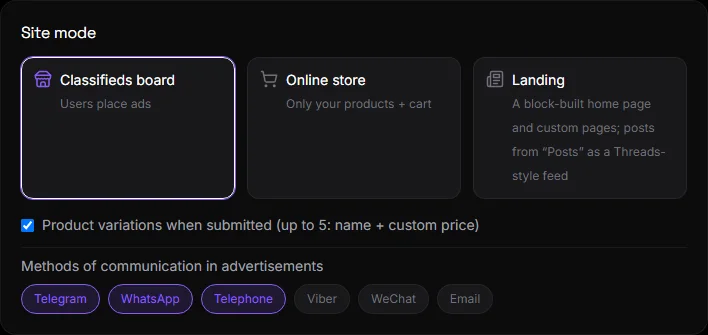
Settings → Site Mode → "Bulletin Board" card. Or step 1 in the guide. The mode is saved immediately. Data is not lost when changing modes.
What does the visitor get?#
- An ad feed with search, categories, and subcategories. On a phone, it's a swipe-up feed, just like in apps.
- Submit an ad using the "+" button at the bottom of the screen: title, description, price, photo, category, and contact information. Log in via Google, Telegram, or phone.
- Favorites, share, report ad.
- An ad page with a gallery, descriptions, a seller banner, and contact buttons: Telegram, WhatsApp, phone, Viber, WeChat, email—you choose which methods are allowed.
What does the owner get?#
Headings and attributes#
A tree of categories with icons or animated stickers. A category can have attributes (characteristics): choice, number, text. Subcategories inherit these attributes. See Categories and Attributes.
Moderation#
In your account, on the main page, you'll find the following tabs: Under Moderation, AI Moderation, Active, Sold, Rejected, Hidden, and Complaints. Moderation Settings:
- "New ads are first reviewed" or "published immediately."
- AI moderation: AI checks your ad based on your criteria. Clean ads are published, while suspicious ones are reviewed manually.
- Auto-detection of categories: if a visitor doesn't select a category, the AI will select one based on the text. You can prevent the AI from creating new categories.
AI features are available on AI-enabled plans. See Ads and Products.
Receiving ads from instant messengers#
Advertisements may come not only from the website:
- From Telegram: groups, channels, and the bot's private messages. The author selects a category using the buttons. The AI extracts the price and title from the text. See Telegram.
- From WhatsApp: groups and your number's private messages. See WhatsApp.
- "Submission via chatbot only" mode: the "+" button on the website leads to the bot.
Auto-publishing#
The bot automatically publishes each new ad to your Telegram channel and/or WhatsApp group. The author receives a link to the post. See Auto-Publishing.
Earnings#
- Paid ad promotion: packages and rates for sellers, payment via Stripe or Monobank. Set up in Integrations → Payment.
- Advertising: your own Google AdSense, your own banners, paid banners from advertisers. See Advertising.
- Free ad limit per seller: beyond the limit, a package is offered for purchase.
Variations and methods of communication#
In the "Site Mode" block:
- Product variations when serving - up to 5 options with a name and price (for example, size or color).
- Contact methods in ads — which contact buttons are available to sellers: Telegram, WhatsApp, phone, Viber, WeChat, email.
Home and pages#
In any mode, you can add blocks above and below the feed, as well as your own pages: "About Us," "Rules," and "Contacts." See Home Page and Site Menu.
Questions and answers#
Can I add ads myself as an owner?#
Yes. Click "Open as administrator" on the dashboard and post an ad on the website. It will be published without moderation.
How do I remove an ad?#
In your account, under the "Active" tab, choose "Hide" or "Reject." There's no permanent deletion—the ad is archived to ensure nothing gets lost.
What do visitors see without registration?#
The entire feed and ad pages. Registration is only required to post an ad and favorites.
Is it possible to switch to the store later?#
Yes. The ads will remain, but the homepage and features will change.